
1. Decide the destination before photographing
Choose the collection that will receive the records and give the batch a recognizable name. Keep the physical group and its photos together during review. You do not need to identify every card to record where it came from.
2. Photograph groups you can review
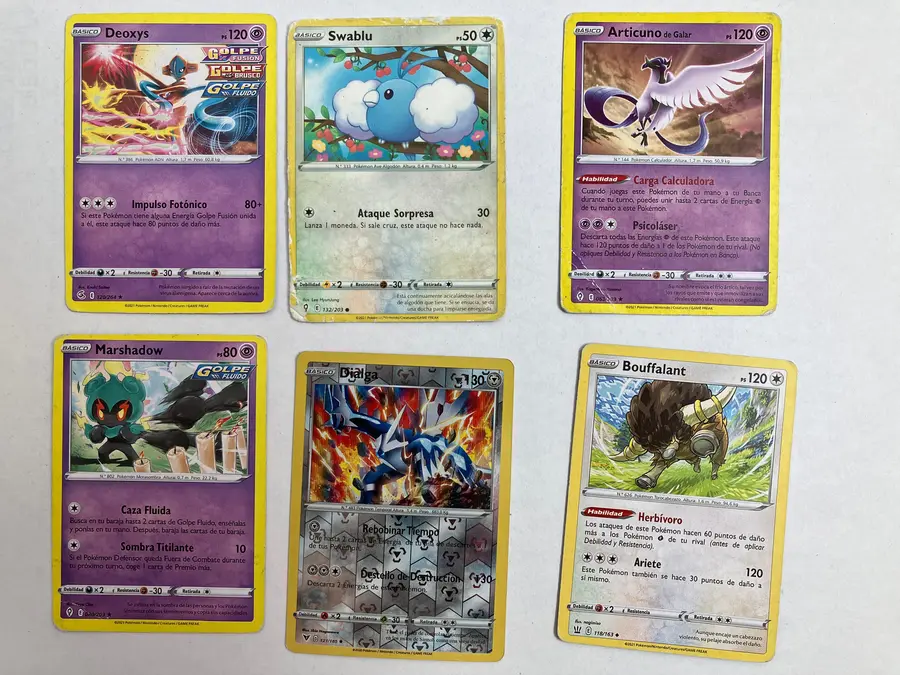
Arrange between one and six cards without overlap, with visible edges and even light. Before continuing, enlarge the photo and check numbers and text. A photo with six blurry cards does not save work; retaking it promptly can.
3. Keep the original and inspect the crops
Each crop should select one card and keep its link to the original. If the crop cuts off the number or includes two cards, adjust it before reviewing identity. The original photo lets you check a correction later.
4. Review by reference, not resemblance
Check name, set and number; then language, finish and variant. Leave attributes pending when they are not visible. Two cards of the same Pokémon are not grouped until the necessary attributes have been checked.
5. Recount and keep a copy
Compare the physical-copy count with the sum of quantities. Export records and keep original photographs. A CSV helps check quantities and references; it does not prove identity, authenticity or value by itself.
Practical questions
Do I need to finish the whole batch before saving?
Separate what is checked from what is pending. Preserve status and provenance so you can return to review without inventing attributes or mixing cards from different originals.
Should I sort by set or name first?
Choose a physical order you can maintain. For the digital reference, name does not replace set, number, language, finish and variant; keep those fields separate even if your boxes use another order.
Local recognition is being validated. The demo is predetermined; it saves no cards and uses no quota. Review attributes against the physical card: condition and authenticity are not certified.